











SAP Business One HANA Migration
Most SAP Business One HANA migration articles start the same way. They describe the benefits of SAP HANA. They mention in-memory computing. They list a few preparation steps. Then they wrap up with a call to contact the author.
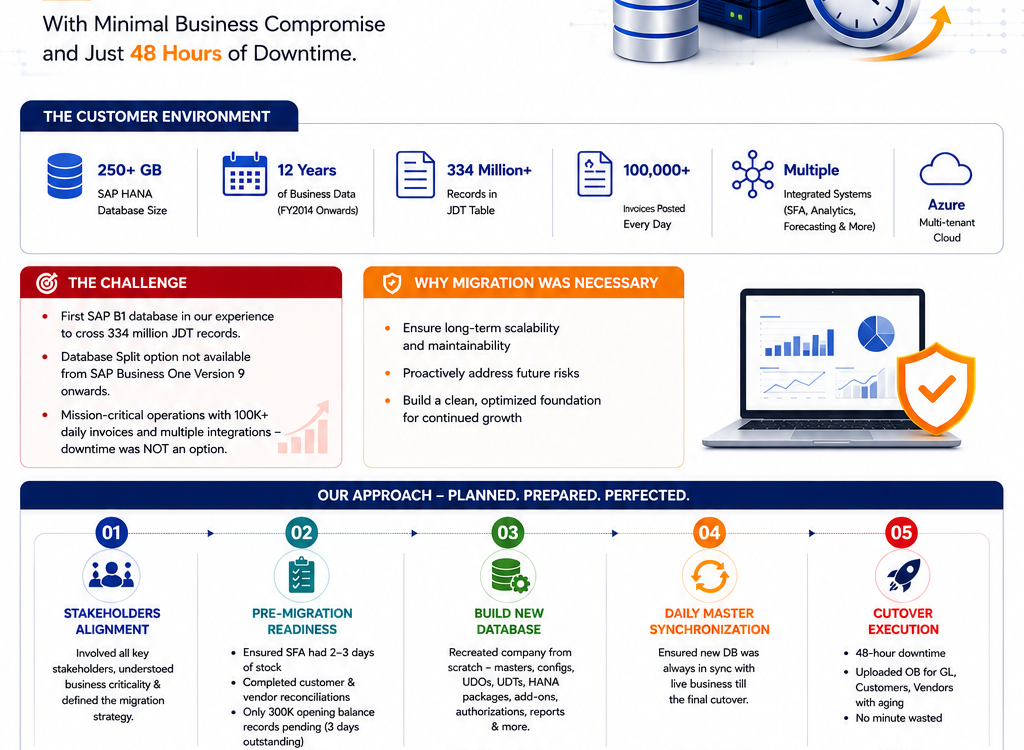
This is a detailed account of one of the most complex SAP Business One HANA database migrations our team at Skysurge has executed in over a decade of implementing and managing SAP Business One environments – including the real numbers, the actual constraints, the unexpected problems, and the tools that made it possible to finish within a 48-hour window.
If you manage a large SAP Business One deployment and you’re evaluating whether migration is necessary, this will give you a realistic picture of what it actually involves.
Why This Migration Case Study Is Different
There’s no shortage of SAP migration content on the internet. Most of it describes the process in broad strokes: back up, migrate, validate, go live. That framing is technically accurate and practically useless for anyone managing a high-volume deployment where stopping business operations for even 24 hours carries real financial consequences.
This project was different because the environment was genuinely large not by general enterprise ERP standards, but specifically in the context of SAP Business One deployments.
Why This Migration Case Study Is Different
Here is what we were working with:
- ERP platform: SAP Business One running on SAP HANA
- Database size: 250+ GB
- Years of data: 12 years (FY2014 through current)
- Journal Entry (JDT1) table records: 334 million+
- Daily invoice volume: approximately 100,000 invoices posted through the SAP Business One Service Layer
- Open balance records at cutover: approximately 300,000
- Infrastructure: Azure-based multi-tenant cloud
- Integrations: Sales Force Automation (SFA), embedded analytics, forecasting platform, custom applications, and multiple third-party integrations
- Allowed downtime window: 48 hours
Every one of these numbers shaped the planning approach. There was no generic template we could apply. Each constraint required a specific solution.
Why Database Size Alone Doesn’t Tell the Full Story
A 250 GB SAP HANA database sounds large. In purely technical terms, SAP HANA handles databases many times that size without issue.
The challenge is not raw storage capacity. The challenge is operational dependency. This customer’s SAP Business One environment is the operational core of their business. It connects to sales automation, inventory systems, forecasting tools, and customer-facing applications all in real time.
That’s what makes large-scale SAP Business One HANA migration genuinely difficult. The technical migration is straightforward. Managing the business ecosystem around it is where most projects either succeed or struggle.
Why Migrate SAP Business One to HANA When Performance Is Fine?
The most common question stakeholders ask before any migration project is the same one we asked ourselves here: “If the system is performing well, why do anything?”
It’s a fair question. In ERP environments, unnecessary change introduces unnecessary risk. But proactive architecture decisions made before a system shows stress are always less expensive and less risky than reactive ones made under pressure.
Proactive Architecture vs. Reactive Crisis Management
SAP HANA can handle very large databases. But SAP Business One is an SME-to-mid-market ERP product, and deployments at this scale – with 334 million records in a single transactional table are uncommon in the SAP B1 ecosystem. This was the first environment in our experience where the Journal Entry table alone had crossed that threshold.
Rather than waiting until performance degraded, backup windows expanded, or maintenance operations became impractical, we conducted a proactive architectural review. The question wasn’t whether problems existed today. The question was whether the architecture was positioned to remain stable over the next five to seven years without structural intervention.
The Database Split Feature SAP Discontinued And What That Means for You
SAP discontinued the Database Split functionality from SAP Business One Version 9 onwards. In earlier versions, Database Split allowed administrators to archive historical transactions into a separate company database to keep the operational database lean.
If you are running SAP Business One on Version 9.0 or later, this option is no longer available. For customers on current versions, there is no native archiving feature equivalent to the old database split functionality.
For this engagement, the discontinuation of Database Split left us with one viable path: create a new SAP Business One company database from scratch and migrate all active and open data into it.
Understanding the Migration Constraint: 48 Hours or Nothing
Before any technical planning began, we had to establish a business constraint: how much downtime could this customer actually tolerate? This conversation is one that implementation consultants often underestimate. The answer has to come from operations, finance, and executive leadership – not from the IT team alone.
100,000 Daily Invoices and a Business That Never Sleeps
This customer operates in the FMCG sector and is one of our largest SAP Business One deployments. They post approximately 100,000 invoices through the SAP Business One Service Layer every single day.
A five-day downtime window, which might be reasonable for a lower-volume ERP environment, would cost this business millions in disruption, delayed shipments, and manual workaround overhead.
After careful analysis of daily operational patterns, the business committed to a single constraint: complete the migration within 48 hours, across a weekend. That commitment became the governing constraint for every decision that followed.
How We Calculated an Acceptable Downtime Window
The 48-hour window was not arbitrary. It emerged from a structured analysis covering five factors:
- Invoice processing cycles:- how many days of unprocessed invoices could the business absorb before cash flow or delivery commitments were impacted?
- SFA independence:- could the field sales application operate offline for the full migration duration?
- Open order risk:- what volume of open orders existed at any given moment, and could these be managed manually for 48 hours if needed?
- Financial period risk:- was there an open period close or regulatory reporting deadline within the migration window?
- Operational peaks:- which weekend sat comfortably away from month-end, quarter-end, and known trading peaks?
The SAP Business One HANA Migration Planning Framework We Used
Preparation for this migration began approximately ten weeks before the cutover weekend. The work covered five distinct tracks running in parallel.
Step 1:- Decoupling Sales Operations Before Cutover
The Sales Force Automation application was the most operationally sensitive dependency. Field sales teams use it in real time. Any gap in inventory data during the migration window would immediately disrupt order taking.
Our approach: pre-load the SFA application with sufficient inventory data to support approximately 2–3 days of independent operations. This gave field teams the ability to continue taking orders and checking stock without a live connection to SAP Business One during the entire migration window.
This pre-loading was not a workaround. It was a deliberate decoupling strategy. When the migration completed and the new database came online, the SFA integration resumed normal synchronization.
Step 2:- Financial Reconciliation and Open Balance Preparation
Before cutover, we completed full customer and vendor reconciliations in the existing system.
Even after this exercise, approximately 300,000 open balance records remained, representing outstanding invoices, credit notes, and payments across customers and vendors. Given the daily transaction volume of this business, 300,000 open records represents roughly three days of normal business activity. That’s a manageable migration payload.
The reconciliation work also identified and resolved a number of discrepancies in the existing system – an unexpected but valuable secondary benefit of the migration preparation process.
Step 3:- Rebuilding the New SAP Business One Company Database
This was the most time-consuming phase of the entire project. Over approximately ten days of continuous effort day and night our team reconstructed the complete SAP Business One environment from scratch.
This included every configuration element that makes an SAP Business One instance specific to a business:
| Configuration layer | Components rebuilt |
|---|---|
| Company & fiscal setup | Company settings, fiscal year configuration, numbering series for all document types |
| Warehouse structure | Warehouses, bin locations, warehouse hierarchies and zone definitions |
| Custom data model | User-Defined Tables (UDTs), User-Defined Objects (UDOs), User-Defined Fields (UDFs) across all relevant objects |
| Security & workflow | User authorizations, permission structures, approval procedures, workflow rules and alerts |
| SAP HANA technical layer | Calculation views, stored procedures, database functions, HANA packages |
| Integration layer | Add-on configurations and licenses, integration framework settings, Service Layer connection parameters |
Nothing in this environment was created by importing a configuration template. Each element was rebuilt, tested, and validated to confirm it behaved identically to the production system. Knowing which configurations interact, which sequences must be followed, and which settings will silently affect downstream behavior — that knowledge only comes from having done this many times before.
Step 4:- Continuous Master Data Synchronization
Business doesn’t pause for migration preparation. During the ten weeks before cutover, the customer continued creating new business partners, adding items to their product catalog, modifying price lists, adding warehouse locations, and onboarding new users.
We built synchronization processes that propagated master data changes from the live environment into the new database on a scheduled basis. These processes ran continuously until the final cutover, ensuring the new database remained as current as possible at the point of go-live. The final synchronization pass happened within hours of the cutover start.
Step 5:- Trial Runs and Validation Cycles
Every migration template including opening balance uploads for General Ledger, customers, vendors, inventory, and aging data – was executed against test environments a minimum of three times before the actual cutover.
Each trial run produced a full validation report. Discrepancies were analyzed, root causes were identified, templates were corrected, and the run was repeated.
The Hidden Challenge: Proving Every Record Migrated Correctly
Technical migration teams often focus on moving data. The harder problem and the one that most directly affects business confidence in the new system is proving that the data arrived correctly.
What 12 Years of Business Partner Data Actually Looks Like
Consider a single business partner record in SAP Business One. A customer who has traded with a business for twelve years accumulates data across a significant number of tables: billing and shipping addresses, contact persons, payment terms, credit limits, bank account details, tax information, applicable price lists, user-defined field values, transaction history references, attachments, and any custom attributes added through add-ons or integrations.
For a fresh go-live, you only need the current master record. For a migration of an operating business, you need every field, every value, and every relationship because open transactions posted years ago may still reference historical data that appears inactive.
Even UDFs that appeared unused could not simply be ignored because historical open transactions might still depend on them. Identifying which fields matter requires someone who understands how SAP Business One uses its own data model not just someone who can run a database export
Why Traditional DTW Reconciliation Breaks Down at Scale
Data Transfer Workbench (DTW) is the standard tool for importing master data and opening balances into SAP Business One. It is powerful and flexible. It is also highly sensitive to input quality.
When we exported the business partner aging data for reconciliation purposes, the resulting Excel files quickly became unmanageable too many rows, too many columns, too many combinations to meaningfully compare manually.
| Approach | Traditional (Excel) | This project (AI-assisted) |
|---|---|---|
| File size | Unmanageable — files crashed Excel | CSV — any size handled |
| Field comparison | Manual, error-prone, inconsistent | Automated field-by-field comparison |
| Time to identify issues | Hours to days | Minutes |
| Exception reporting | Manual flagging, subjective | Automated exception report with field-level detail |
| Re-validation after fix | Repeat full process from scratch | Re-run comparison in seconds |
| Team required | Large dedicated reconciliation team | One analyst plus the tool |
The AI-Assisted Reconciliation Approach That Changed Our Process
Instead of building a reconciliation utility from scratch or spending days in spreadsheets, we used AI to build a lightweight comparison application in approximately ten minutes.
The tool accepted two CSV files: source data from the old database and migrated data from the new database. It then compared records automatically, matched fields intelligently, highlighted differences, produced exception reports, identified missing records, and flagged incorrect values field by field.
The very first execution revealed several upload inconsistencies that would have taken hours or even days to detect manually. Within minutes, we corrected the issues, regenerated the uploads, and validated the results again.
What the Migration Looked Like From the Business Side
The 48-Hour Cutover Timeline
The cutover weekend followed a structured sequence. Every phase had been pre-validated across multiple trial runs before the actual window began.
TIME WINDOW | ACTIVITY |
Hour 0–4 | Production system locked. Final data exports initiated from live database. |
Hour 4–12 | Final master data synchronization from live to new database. DTW opening balance imports executed for GL, customers, vendors, inventory, and aging. AI reconciliation tool validates each dataset before proceeding. |
Hour 12–24 | Integration reconfiguration and connection testing for all third-party applications including SFA, analytics platform and forecasting tools. |
Hour 24–36 | End-to-end functional testing across all major business processes: order creation, invoice posting, inventory transactions, approval workflows. |
Hour 36–42 | Financial reconciliation and formal sign-off by the customer’s finance team. GL balances, customer aging, and vendor aging all confirmed against pre-migration exports. |
Hour 42–48 | Final performance checks on new database under simulated load. Go-live approval obtained. System unlocked for business use. |
What End Users Experienced on Monday Morning
Users logged into SAP Business One at the start of the business day and found their environment exactly as they expected it.
Their open orders were there. Their customer records were complete. Their approval procedures behaved as before. Their custom fields held their values. Their price lists were current. The system was operationally identical to what they had left on Friday except that everything now ran on a new, architecturally optimized company database.
Financial and Operational Validation Results
Before the business team unlocked the system for general use, the finance team completed a structured validation:
- General Ledger opening balances: matched to source system
- Customer aging report: reconciled to the pre-migration export
- Vendor aging report: reconciled to the pre-migration export
- Inventory balances: confirmed across all warehouses and bin locations
- SFA integration: resumed normal synchronization
- Analytics platform: reconnected and operational
- Service Layer: processing invoices at normal volume
No financial discrepancies required post-go-live correction.
SAP Business One HANA Migration Checklist for Large Deployments
Use this framework as a starting point. Every environment is different, and your specific migration plan will depend on database size, integration landscape, business operating model, and available downtime.
1. Pre-Migration (4–10 Weeks Before Cutover)
- Complete current-state architecture documentation
- Identify all integrated applications and data dependencies
- Establish maximum acceptable downtime with business leadership
- Confirm migration weekend based on operational calendar
- Build new SAP Business One company database in parallel environment
- Recreate all configuration: numbering series, warehouses, UDTs, UDFs, UDOs
- Migrate technical components: HANA views, stored procedures, add-ons, integration configs
- Build master data synchronization processes between live and new database
- Define opening balance migration scope: customers, vendors, GL, inventory, aging
- Develop and test DTW templates for each data category
- Build or acquire automated reconciliation tooling
2. Cutover Week Preparation
- Execute final pre-cutover reconciliations in the live system
- Complete minimum three full trial migration runs with full validation each time
- Pre-load SFA and offline-capable systems with sufficient operational data
- Communicate migration schedule clearly to all users and stakeholders
- Confirm rollback plan and fallback criteria with project sponsor
- Prepare go/no-go decision framework and criteria before cutover start
- Brief finance team on their validation responsibilities and sign-off criteria
3. During the Migration Window
- Lock production system and document exact cutover start time
- Execute final master data synchronization from live to new database
- Run opening balance imports in defined sequence – GL first, then customers, vendors, inventory
- Validate each dataset using reconciliation tooling before proceeding to the next
- Reconnect all integrations and confirm bidirectional data flow for each
- Complete end-to-end functional testing across all core business processes
- Obtain finance team sign-off on reconciled balances documented and signed
- Complete performance validation on new database
- Execute go/no-go decision with project sponsor, proceed or invoke rollback
4. Post-Migration Validation
- Monitor system performance continuously for first 72 hours post go-live
- Confirm Service Layer is processing invoices at expected daily volume
- Validate all integration event logs for errors or missed transactions
- Address any user-reported issues through structured triage process
- Archive legacy database and confirm data retention policy with stakeholders
- Document lessons learned and update internal knowledge base
How Skysurge Approaches Complex SAP Business One Migrations
At Skysurge, we have spent over a decade building and managing SAP Business One environments across a range of industries, database sizes, and infrastructure configurations.
The project described in this article represents the kind of engagement where deep SAP Business One expertise, cloud infrastructure capability, and modern AI tooling intersect. We didn’t execute it using a generic migration template. We designed a migration approach specific to this customer’s operational reality and we validated every element before we committed to the cutover window.
We work with businesses in wholesale and distribution, consumer products, manufacturing, retail, and trading – anywhere SAP Business One is the operational backbone of the business.
As an authorised SAP and Microsoft partner in India, we bring both the technical depth and the business understanding that large-scale migrations require.
